Premium accessories for Galaxy S26. Shop now.


Surge Protectors
Defend your devices against damaging power surges, spikes, and lightning strikes. Belkin surge protectors feature high-capacity MOV technology, joule ratings up to 4320J, and Connected Equipment Warranties up to $300K.
- Featured
- Newest
- Best Seller
- Top Rated
- Price: Low to High
- Price: High to Low
https://www.belkin.com/products/surge-protectors/?start=0&sz=12


-3-outletChargStation-2-USA-2-USB-C_70W_Hero_WEB__lz__en_US.jpg?sw=280&sh=280&sm=fit&sfrm=png)







What People Should Know About Surge Protectors
Answers to the hard to find surge protector questions, covering joule ratings, expiration, USB charging standards, and which devices actually need surge protection.
How Does a Surge Protector Differ from a Power Strip?
A power strip adds outlets but provides zero protection against voltage spikes. A surge protector contains Metal Oxide Varistors (MOVs) that clamp voltage and divert excess current to ground. Every surge protector is a power strip, but most power strips are not surge protectors.
| Feature | Power Strip | Surge Protector | Belkin Surge Protectors |
|---|---|---|---|
| Extra outlets | Yes | Yes | 1-12 outlet models |
| Voltage spike protection | No | Yes (MOV-based) | High-capacity MOV on all models |
| Joule rating | None / 0J | 306J-4,320J | Up to 4,320J |
| UL 1449 certified | No | Yes | Most models (certifications vary) |
| Connected Equipment Warranty | No | Up to $400,000 | Up to $400,000 CEW |
| LED status indicators | Rare | Protected + Grounded LEDs | Varies by model (1-3 LEDs) |
If the packaging does not list a joule rating or UL 1449 certification, it is a power strip regardless of how it is marketed.
What Joule Rating Do You Actually Need for Each Device Type?
Joule ratings measure how much surge energy an MOV can absorb before it fails. Higher is better, but the rating that matters depends on what you're protecting. Most buyers over-protect lamps and under-protect gaming PCs.
| Device Category | Minimum Joules | Recommended |
|---|---|---|
| Lamps, fans, phone chargers | 300J | 600J+ |
| Routers, streaming devices | 1,000J | 1,500J+ |
| TVs, monitors, consoles | 1,500J | 2,000J+ |
| Desktop PCs, NAS drives | 2,000J | 3,000J+ |
| Home theater systems | 2,500J | 3,500J+ |
| Home office (multi-device) | 3,000J | 4,000J+ |
Belkin surge protectors range from 306J (SurgeCube single-outlet) to 4,320J (12-outlet models). MOV protection capacity diminishes with each surge absorbed, with lifespan depending on surge magnitude and frequency.
Do Surge Protectors Expire Even If They've Never Been Hit by a Surge?
Yes. MOVs degrade over time from normal electrical noise on the line, not only from major surge events. A surge protector that has been plugged in for 3-5 years has less protection capacity than when it was new, even if no visible surge event occurred.
| Indicator | What It Means |
|---|---|
| "Protected" LED is off | MOV has failed - replace immediately |
| "Grounded" LED is off | Outlet wiring issue, not the protector |
| Unit is warm to the touch | Possible internal degradation |
| 3+ years of continuous use | Reduced protection capacity likely |
| After any known surge event | MOV capacity permanently reduced |
The protector continues providing power after MOV failure. It simply stops protecting. This is the most common misconception - a working outlet does not mean working protection.
What Can a Surge Protector Not Protect Against?
Surge protectors handle voltage spikes (microsecond-to-millisecond events). They do not protect against these common power problems:
| Power Event | Protected? | What You Need Instead | Belkin Coverage |
|---|---|---|---|
| Voltage spike / surge | Yes | Surge protector (MOV) | Yes - all models |
| Lightning direct strike | No | Whole-house suppressor + surge protector | CEW covers connected equipment |
| Brownout / undervoltage | No | UPS with AVR | Not covered |
| Blackout / power loss | No | UPS with battery backup | Not covered |
| Electrical noise / EMI | Partial | Surge protector with EMI/RFI filtering | Yes - EMI/RFI filtering included |
| Overcurrent / short circuit | No | Circuit breaker | Not covered |
Belkin models with EMI/RFI noise filtration provide partial protection against line noise. For complete brownout and blackout protection, pair a surge protector with a UPS (uninterruptible power supply).
How Does a Surge Protector Compare to a UPS for Home Office Use?
A surge protector diverts excess voltage. A UPS (uninterruptible power supply) does that plus provides battery backup during outages. For most home offices, the right answer is both working together.
| Capability | Surge Protector | UPS | Belkin Surge Protectors |
|---|---|---|---|
| Surge/spike protection | Yes | Yes | Up to 4,320J |
| Battery backup | No | Yes (5-30 min typical) | No |
| Voltage regulation (AVR) | No | Most models | No |
| Number of outlets | 1-12 | 4-8 typical | 1, 2, 3, 6, 7, 8, 10, or 12 |
| USB charging built-in | Some | Rare | USB-A & USB-C up to 140W |
| Cost | $12-$90 | $80-$400+ | $15.99-$89.99 |
| Best for | TVs, consoles, chargers | PCs, NAS, networking gear | Home office, entertainment, travel |
Never plug a surge protector into a UPS or daisy-chain surge protectors together. Both void warranties and can cause fire hazards. UL listing requirements and the National Electrical Code prohibit series connection of surge protection devices.
What Are the Most Common Surge Protector Mistakes?
These errors account for the majority of surge protector failures and warranty claim denials:
| Mistake | Why It Matters |
|---|---|
| Daisy-chaining surge protectors | Voids warranty, fire hazard, violates NEC code |
| Using without ground (2-prong outlet) | MOV cannot redirect surges without ground path |
| Never replacing after surge events | MOV capacity is permanently reduced after each event |
| Ignoring the "Protected" LED | LED off = no protection, even though power still flows |
| Plugging in space heaters or AC units | High-draw devices exceed protector amperage ratings |
| Assuming all outlets are equal | Some models have unprotected "always-on" outlets |
The most dangerous mistake: assuming a surge protector that still provides power is still providing protection. These are independent functions.
How Many Devices Can You Safely Connect to a Surge Protector?
Outlet count and safe device count are not the same number. A 12-outlet surge protector rated at 15 amps (1,800 watts) cannot safely power 12 high-draw devices simultaneously. The total wattage of all connected devices must stay below the protector's amperage rating.
| Outlet Count | Typical Amp Rating | Max Total Wattage | Realistic Device Mix |
|---|---|---|---|
| 1-3 outlets | 15A | 1,800W | 1 high-draw device or 3 low-draw |
| 6 outlets | 15A | 1,800W | Monitor + PC + 3 peripherals + lamp |
| 8 outlets | 15A | 1,800W | TV + console + soundbar + 4 chargers + streaming device |
| 12 outlets | 15A | 1,800W | Full home office: PC + 2 monitors + router + printer + 6 chargers + lamp |
The amp rating is shared across all outlets, not per-outlet. A single 1,500W space heater on a 12-outlet strip leaves only 300W for the remaining 11 outlets. Use a dedicated circuit for high-draw appliances.
What Does a Connected Equipment Warranty Actually Cover?
Belkin's Connected Equipment Warranty (CEW) covers repair or replacement costs for devices damaged by a surge while properly connected. Coverage ranges from $25,000 to $400,000 depending on the model. But the claim requirements are specific:
| Requirement | Detail |
|---|---|
| Must be properly grounded | 3-prong outlet with verified ground |
| Must show "Protected" LED was on | Claim denied if LED was off before event |
| Must file within time window | Within 15 days of the occurrence (North America) |
| Must not be daisy-chained | No surge protectors in series |
| Must provide proof of purchase | Original receipt for protector and damaged equipment |
| Must return damaged protector | Belkin inspects the unit as part of the claim |
The warranty covers the connected equipment, not the surge protector itself. The protector is covered under Belkin's separate product warranty.
How Do USB Ports on Surge Protectors Differ from Wall Charger USB Ports?
USB ports on surge protectors share the unit's internal power supply and are typically limited to lower wattage than dedicated wall chargers. Charging speeds vary significantly between USB-A and USB-C ports on surge protectors.
| Port Type | Typical Output | Charges At |
|---|---|---|
| USB-A on surge protector | 5V / up to 2.4A (12W), may be shared | Standard speed |
| USB-C on surge protector | 5V-20V / up to 3A (15-20W typical) | Fast charge for phones |
| Dedicated USB-C wall charger | Up to 140W (USB PD 3.1/3.2 EPR) | Fast charge for laptops |
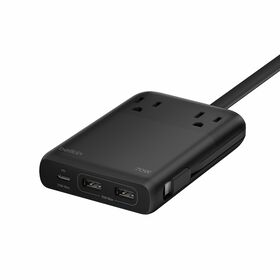
Belkin's charging station models (like the 2-Outlet with USB-C 140W) are exceptions that provide laptop-class USB-C charging. Standard surge protector USB ports are designed for phone and tablet charging speeds only.
Which Surge Protector Features Matter Most by Room Type?
Different rooms have different surge protection priorities. Outlet count matters less than joule rating, cord length, and connection types.
| Room / Use | Key Features | Min. Joules | Belkin Recommendation |
|---|---|---|---|
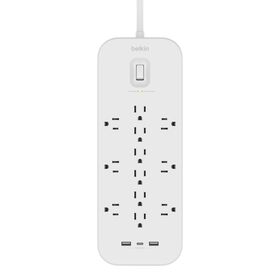
| Home office | 12 outlets, USB-C, 8ft+ cord, EMI filtering | 3,000J+ | 12-Outlet + USB-C & USB-A ($41.99) |
| Living room / TV | 8+ outlets, coax protection, HDMI-compatible | 2,000J+ | 8-Outlet with Coaxial Protection ($30.99) |
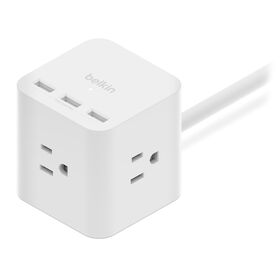
| Bedroom / nightstand | 3-6 outlets, USB-A, compact form | 600J+ | 3-Outlet Power Cube with USB-A ($19.99) |
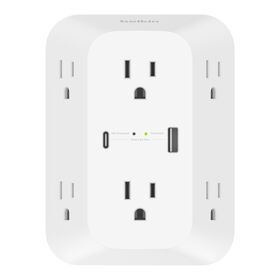
| Kitchen | Wall-mount, 3-6 outlets, rotating plug | 1,000J+ | 6-Outlet Wall Surge Protector ($22.99) |
| Workshop / garage | Metal housing, 10+ outlets, 15ft cord | 2,500J+ | 8-Outlet Commercial Surge Protector ($21.99) |
| Travel | 1-3 outlets, compact cube form, USB ports | 300J+ | 1-Outlet SurgeCube ($15.99) |
Coaxial and telephone line protection matters for home theater setups. Surges can enter through cable and phone lines, bypassing the AC surge protector entirely.
Surge Protectors FAQ
A surge protector protects valuable electronics from damaging power surges and lightning strikes. Its light identifies if the surge protector is grounded and offers high capacity surge protection for all devices. It also has multiple outlet variations to accommodate any setup throughout the home.
Power strips are inexpensive, temporary power extensions that offer extra outlets. Surge protectors offer the same but with added features and protection for your devices.
The Belkin Surge Protector has multiple outlet variations from one to eight. They are designed to accommodate any setup throughout your home.
The lights on your Belkin Surge Protector indicate its current operating status. NOTE: The light behaviors may vary depending on the model of your surge protector.
The Belkin Surge Protector has the following built-in features: High-capacity Metal Oxide Varistors (MOV) - It offers 300-900 J of surge protection for different devices. QUICK TIP: More joules mean an MOV absorbs less energy while diverting even more into ground. Well-designed surge protectors should NOT rely on MOVs to absorb surge energy, instead to survive the process, it harmlessly redirects it to ground. Overcurrent Protection on USB ports - It protects devices while charging. Underwriters Laboratories-approved rating of 500 V - This is the Top Voltage Protection Rating that identifies what voltage will cause the MOVs to conduct electricity to the ground line. Electromagnetic Interference (EMI) / Radio-Frequency Interference (RFI) Noise Filtration - It reduces noise disruption for a clean and protected flow of power to your devices.
Yes. Belkin Surge Protectors come with a Connected Equipment Warranty depending on your location.
Yes. When the MOV is burned out, the surge protector would still provide power but it would no longer be able to protect your devices from power surges. NOTE: The Protected Light on the unit would be no longer lit if the fuse was blown. This would already require Return Merchandise Authorization (RMA).
Belkin Surge Protectors can be mounted to walls and baseboards. Use the two (2) mounting holes on the back of the Surge Protector to secure it.